Showing posts with label security. Show all posts

Sunday, 8 June 2025

USB safe charging


Do you charge your device in a public or on a non secure work space ? if the answer is yes then you are leaving your device open to be hacked.


Here is what Gemini has to say


A USB charge-only cable is a type of USB cable specifically designed to deliver power to a device without allowing any data transfer. Unlike standard USB data cables, which have four wires (two for power and two for data), charge-only cables only have the two power wires connected.

How it works:

Standard USB ports on computers or public charging stations are capable of both power delivery and data transfer. A charge-only cable physically blocks the data lines, ensuring that only electrical current flows between the charging source and the device.

Advantages:

 * Security: This is the primary benefit. By eliminating data transfer, charge-only cables prevent "juice jacking" (a type of cyberattack where malicious software or data is transferred to or from a device through a compromised charging port). This is particularly useful when using public charging stations in airports, cafes, or other unsecure environments.

 * Simplicity: If you only need to charge a device and don't require data syncing, a charge-only cable is a straightforward solution.

 * Potentially faster charging: In some cases, with all power dedicated to charging and no diversion for data processes, it might lead to slightly faster charging times.

Disadvantages:

 * No data transfer: The obvious drawback is that you cannot sync data, transfer files, or connect your device to a computer for any function beyond charging.

 * May not be explicitly labeled: The USB Implementers Forum (USB-IF) doesn't mandate clear differentiation between charge-only and data cables, so it can sometimes be difficult to tell them apart without testing or looking for specific markings. Data cables tend to be slightly thicker due to having more wires.

 * Slower charging in some cases: While sometimes faster, if a device "handshakes" with the charger to negotiate optimal power delivery, and that negotiation relies on data lines, a charge-only cable might result in slower charging if the device cannot communicate its charging needs.

Applications:

 * Public charging stations: The most common and important use case is for safely charging devices at public USB ports where you cannot guarantee the security of the source.

 * High-security environments: In corporate, government, or defense settings, charge-only cables can be used to prevent accidental or malicious data transfer from mobile devices.

 * Travel: For general peace of mind when traveling and needing to charge your devices in unfamiliar locations.

Some products exist that are "USB data blockers" which are small adapters that you can plug onto your regular USB cable to turn it into a charge-only cable, offering flexibility

Monday, 9 September 2024

Passwords Made Easy


Today i thought i would write about password security.

As we are all aware passwords are important but we continue to use very poor passwords when prompted for a new password. Here are some of them that have been used in the passed.

123456

password

123456789

12345678

12345

1234567

admin

123123

qwerty

abc123

I have even seen google used as a password.

 Use a password generator and a password checker like the links below to find a safe password. 

Password generator

random password generator#android

The alternative is pick a random word of about eight letters, chose 4 digit or more number and pick a couple non alfa numerically character @#£% etc. You then stich them together like mydaDd@987690#

Try using a password generator and a password checker like the links below to keep you surfing safely. These web sites will help you to secure your computer and application.

The alternative is pick a random word of about eight letters, chose 4 digit or more number and pick a couple non alfa numerically character @#£% etc. You then stich them together like mydaDd@987690#

If you found this useful why not buy me a coffee..


Tuesday, 19 March 2019

Birthday Date locks You Out

Beware Twitter Do not add your birthday Wrong


Image result for twitter image


Adding you birthday in wrong into your Twitter profile could cause you untold anguish. If the date you put in makes you 13 years of age then you account is instantly locked and you have to upload evidence that you are over 13. No second chance or a are you sure, your out!

After filling in the appropreate form and showing them you Driving licence that is it you are at there mercy. You have to log on to the locked account to talk to them, but you can not because you our locked out. Do not fill in the birthday date and they will not ask.

Nice one Twitter  a 13 year old could do better than that.

Thursday, 14 December 2017

Massive File of clear text Passwords Found


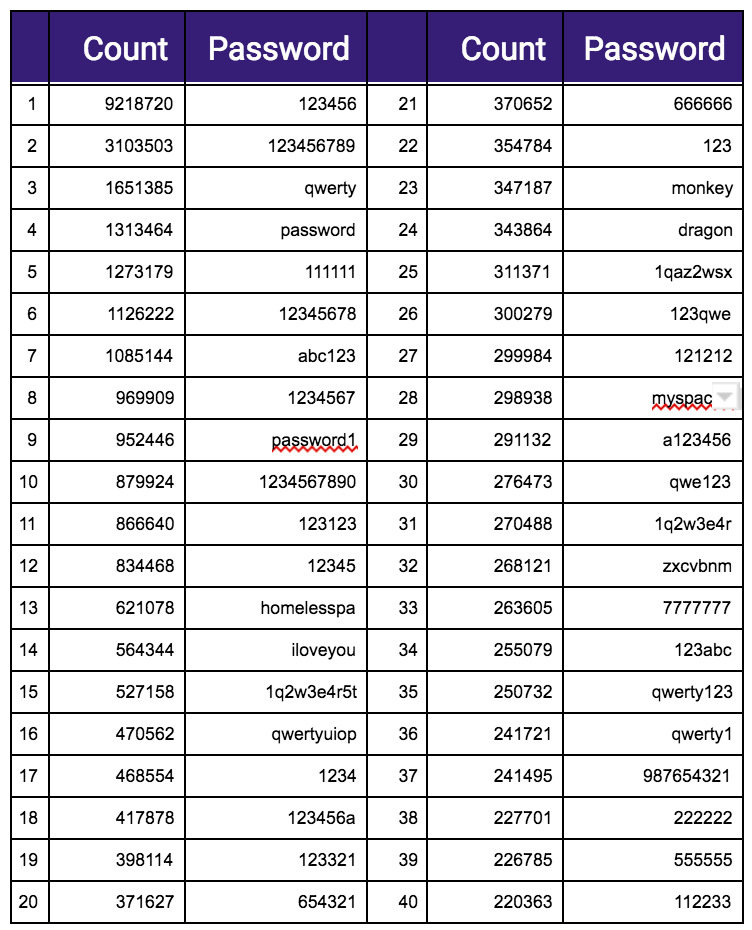
A massive database of stolen username and passwords in clear text has been found on the dark net. The dump containing 1.4 billion  usernames and passwords  and is 41 GB in size and seems to be a depository for all data breaches.
   The file was  found by 4IQ  while searching the dark web for stolen or leaked data. More on the story here.

   The table below shows the most common passwords found in the file and if yoou are using one you should change it now.


Friday, 16 December 2016

Structure that Password


Passwords are the bain of most users life we forget them and then get locked out and have to wait until they have been reset or we have to go through a long recovery procces. This may even include a call to get your account unlocked.
With banks and companies who hold banking details this a way of securing you data so that you do not loses out financially. with others it is to protect you personal data. The set up of one of these accounts can be laborious and having completed it you go to log on and your password is not correct so around you go.
Is there a way to make this easyer on the user well I think so, with some though to how you form a password and username and a little help from the web site owners.

Create password that you will remember by using the site name or the first 4 letters of the name like

Blogger.com   ---- Blog

then add a special character say an %

Blog%

Then add some numbers that will always be the same for each site say 1945
blog%1945

there you have a password that changes for each site yet is different, for added security you could add another special character say ?

Blog%1945?

Of course the secret is not to tell anyone what you use. All you have to remember is %1945? the front bit you get from the site. There are site that do not allow special characters so for those sites just miss them off.


There is also  now a trend to make your user name case sensitive so probably the best way to do this is to use upper and lower case in your user name. Use the same one for every site IE Joeblogs263 this way you can not forget it.

A little help from the sites would be nice. Lets say I have just set up a username and password in stead of going live straight away you  ask  the applicant to log in using the new details but this is a test logon to see if the credentials match after the process has been completed. This would give every one a chance to test out there username and password be for going live.

 Come on developers how many times have you had the wrong keyboard settings and got $ Not @

Sunday, 30 October 2011

Do you own your web site

     Are you a SME with your own web stite then ask yourself "Do I Own IT" Of course id do you may say i pay the fee every month.
     But do you? Could your web design \ provider pull the plug at any time. You may pay at your set period but who owns the site. is the web site domain name  www.an example.co.UK registered to you or your web designer or provider. You should check with the domain name registrar to see who owns the name, don't assume check the WHOIS Simply enter your domain and get who owns it. It may surprise you who actually does own the name.
   Check who's servers the site is hosted on and check up on them as you would any other company supplier, if they fail your site goes down. This brings us to the next question who owns he source code for the site you need to own this and keep an upto date copy. This is vital if you want to change the site and use another web company or you may have to redevelop the site costing you extra money.
   If you use SMTP mail ie Mail is redirected to you exchange server  Then make sure you have control of the MX record or you could lose access to your mail.


To recap
  1. Make sure you own the domain name
  2. Make sure you own the source code
  3. Make sure the hoating company is secure both financially and security wise.
  4. Make sure you control the MX record.


Multi Point USB Charger

  USB Plug Charger, 4-Port USB Fast Charger Plug with 33W Intelligent Quick Charge 3.0 Wall Charger, Multi USBPower Adapter UK Fast Charging...