Showing posts with label password. Show all posts

Monday, 9 September 2024

Passwords Made Easy


Today i thought i would write about password security.

As we are all aware passwords are important but we continue to use very poor passwords when prompted for a new password. Here are some of them that have been used in the passed.

123456

password

123456789

12345678

12345

1234567

admin

123123

qwerty

abc123

I have even seen google used as a password.

 Use a password generator and a password checker like the links below to find a safe password. 

Password generator

random password generator#android

The alternative is pick a random word of about eight letters, chose 4 digit or more number and pick a couple non alfa numerically character @#£% etc. You then stich them together like mydaDd@987690#

Try using a password generator and a password checker like the links below to keep you surfing safely. These web sites will help you to secure your computer and application.

The alternative is pick a random word of about eight letters, chose 4 digit or more number and pick a couple non alfa numerically character @#£% etc. You then stich them together like mydaDd@987690#

If you found this useful why not buy me a coffee..


Thursday, 14 December 2017

Massive File of clear text Passwords Found


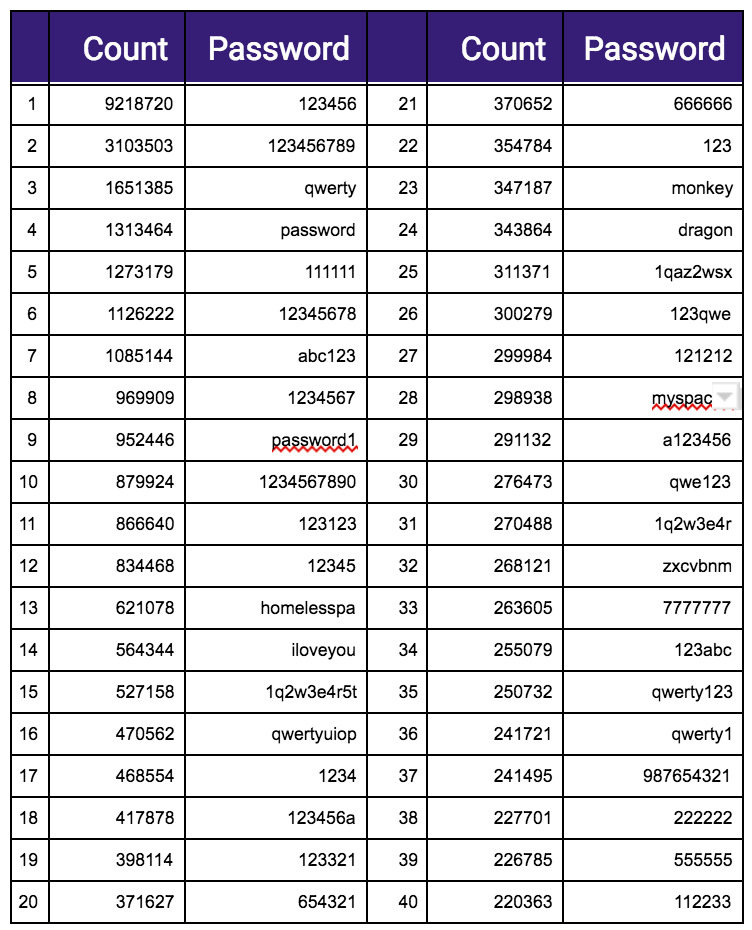
A massive database of stolen username and passwords in clear text has been found on the dark net. The dump containing 1.4 billion  usernames and passwords  and is 41 GB in size and seems to be a depository for all data breaches.
   The file was  found by 4IQ  while searching the dark web for stolen or leaked data. More on the story here.

   The table below shows the most common passwords found in the file and if yoou are using one you should change it now.


Friday, 16 December 2016

Structure that Password


Passwords are the bain of most users life we forget them and then get locked out and have to wait until they have been reset or we have to go through a long recovery procces. This may even include a call to get your account unlocked.
With banks and companies who hold banking details this a way of securing you data so that you do not loses out financially. with others it is to protect you personal data. The set up of one of these accounts can be laborious and having completed it you go to log on and your password is not correct so around you go.
Is there a way to make this easyer on the user well I think so, with some though to how you form a password and username and a little help from the web site owners.

Create password that you will remember by using the site name or the first 4 letters of the name like

Blogger.com   ---- Blog

then add a special character say an %

Blog%

Then add some numbers that will always be the same for each site say 1945
blog%1945

there you have a password that changes for each site yet is different, for added security you could add another special character say ?

Blog%1945?

Of course the secret is not to tell anyone what you use. All you have to remember is %1945? the front bit you get from the site. There are site that do not allow special characters so for those sites just miss them off.


There is also  now a trend to make your user name case sensitive so probably the best way to do this is to use upper and lower case in your user name. Use the same one for every site IE Joeblogs263 this way you can not forget it.

A little help from the sites would be nice. Lets say I have just set up a username and password in stead of going live straight away you  ask  the applicant to log in using the new details but this is a test logon to see if the credentials match after the process has been completed. This would give every one a chance to test out there username and password be for going live.

 Come on developers how many times have you had the wrong keyboard settings and got $ Not @

Thursday, 9 October 2014

Sage password problem


If your passwords in sage accounts 50 suddenly are not working this may be due to a failure of operating system not sage itself.
   The first course of action is to try all the passwords including the manager password, if all these are rejected  not found then try the following
If you have forgotten the passwords then contact sage  support if you have it if not download a password cracker from the net they do exist.

If your our sure of the passwords try the following

  • Run the dot.net fix from Microsoft   this can be found here , then try again
  • Next try to repair the installation from the cd
    • Control panel - Add remove
    • Select remove then Repair
  •  If this fails contact you IT specialist and have them check all permissions and check that no part of the system is corrupt.
  • Or try This http://www.accpwr.co.uk/ This is a password cracker for  accounts and payroll AccPWR will allow you to gain access to your Sage Accounting, Payroll and Compatibilité data when you no longer have access to the password. No need to send your data to a 3rd party - recover / reset the password yourself.


Make sure you do regular backups as failure to do so could cost you all of your accounts not just one days.

Multi Point USB Charger

  USB Plug Charger, 4-Port USB Fast Charger Plug with 33W Intelligent Quick Charge 3.0 Wall Charger, Multi USBPower Adapter UK Fast Charging...